DocsMake sound
Audio
Audio makes the sound for your videos. Type the words to speak, describe a piece of music, or describe a sound, and press Generate. The price is on the button.
What you will make
Three kinds of sound, each from a sentence or two:
- Voice a line: your exact words, read aloud in a voice you pick, in the language you pick.
- Music: a track for a scene or a whole film, with or without a singer.
- Sound effect: a door, footsteps, rain on a window, from half a second to 30 seconds. It can loop.
Audio makes sound only. For a person who speaks on screen, with a face, use Avatar. To put sound on a timeline, use Director; to put music under a whole film, use Movie and Film.
A voice line from start to finish
Say you need one line for a scene.
- Open Audio in the menu on the left.
- Choose Voice a line above the box. The box asks What should they say?
- Type the exact words: "We have ten minutes before the storm hits."
- Open the Voice pill, which starts as Voice: Default voice. The list shows the voices of the chosen model, and each has a play button to hear a sample first. Pick one.
- Look at the line under the box: About 0.42 credits for this line. The same number is on the button. With the box empty it says Priced by the length of the line.
- Press Generate. The line shows in Your audio with a play button, and in Recent audio on the right.
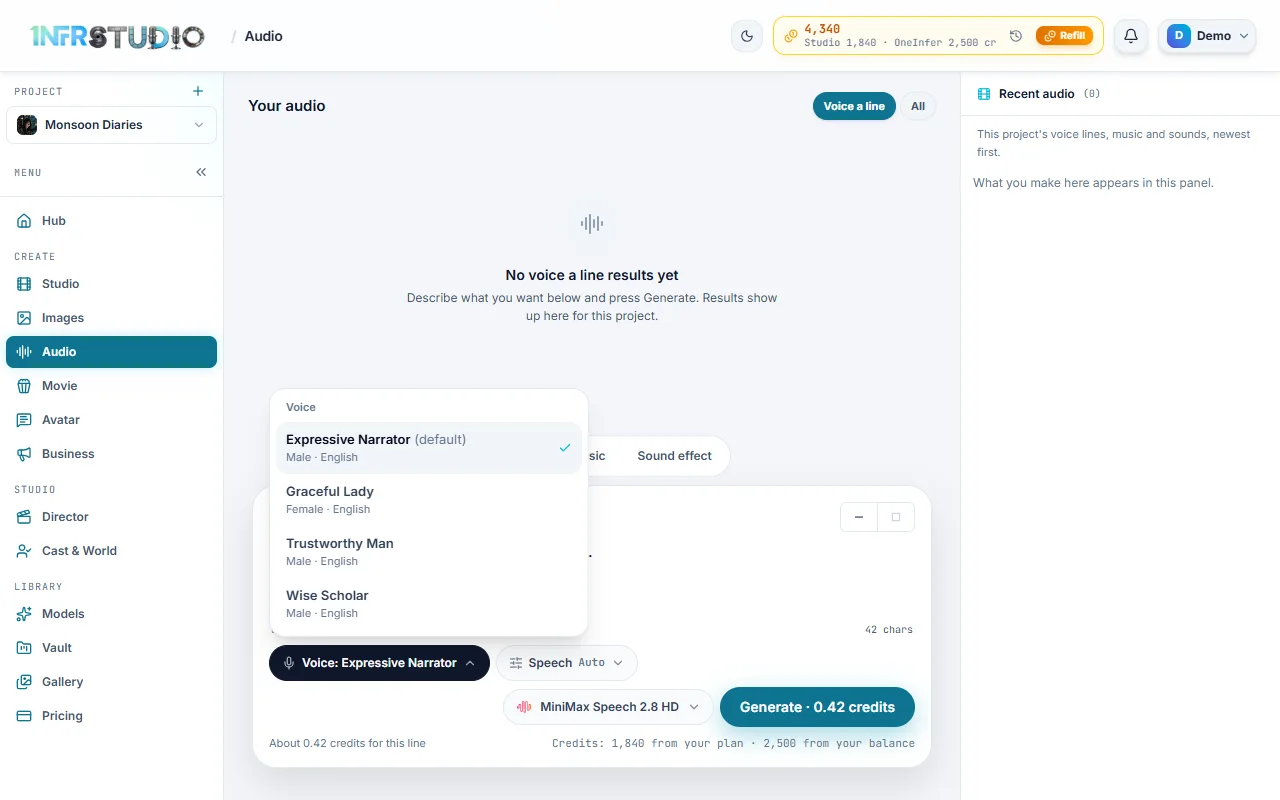
Speech is priced by how many characters you type, so a short line costs a fraction of a credit and a minute of narration costs a few credits. Only one voice line, one track or one sound can be made at a time; while one is being made the line under the box says Wait for the current one to finish.
What you will see
The three choices (Voice a line, Music, Sound effect) sit above the prompt box. Under the box, left to right:
| Control | What it does |
|---|---|
| Voice | Voice lines only. Chooses the voice. |
| Speech, Track or Sound | One settings pill for the kind you chose. It shows a summary of what is set, for example "30s". See Settings. |
| The model name | The model that makes it. Its list shows what each costs. |
| Generate | Makes it. Carries the price, for example Generate · 7.5 credits. |
For music there is also Polish prompt, which rewrites your description with instruments and mix details; you can edit the result before you generate. Below, Your audio lists what this project has made, with the filter Voice a line (or the kind you are on) and All.
Models and what they cost
Prices are in credits (100 credits is $1). They follow the length, and Audio shows the exact number before you press Generate.
Voice lines
| Model | Best for | About, per 1,000 characters |
|---|---|---|
| MiniMax Speech 2.8 HD | Clear, natural narration. The default. | 10 credits |
| MiniMax Speech 2.8 Turbo | Faster, cheaper lines for drafts. | 6 credits |
| Eleven v3 | The most expressive acting and emotion. | 8 credits |
| Eleven v4 | Natural, steady lines at full quality. | 2.2 credits |
| Eleven v4 Turbo | Low-cost lines that still sound natural. | 1.1 credits |
| Fish Audio S2.1 Pro | Character voices at a low price. | 1.5 credits |
| Sarvam Bulbul v3 | Indian languages and accents. | About 3.1 credits |
A thousand characters is a few paragraphs, roughly a minute of speech.
Music
| Model | Best for | Price |
|---|---|---|
| Eleven Music v2.5 | Best all-round music. You pick the length. The default. | 0.25 credits a second |
| Eleven Music v2 | Music to an exact length. | 0.25 credits a second |
| Lyria 3 | Quick, cheap cues. The model picks the length. | 4 credits a track |
So 30 seconds of Eleven music is 7.5 credits, a minute is 15 and two minutes is 30.
Sound effects
Eleven Sound Effects v2: 0.4 credits a second. The default length is 5 seconds, 2 credits. If you choose Let the model choose, the button says "up to" and quotes the 30-second ceiling, 12 credits.
Settings by kind
Open the settings pill (Speech, Track or Sound). It shows only what the chosen model can do.
Voice lines
- Speed: a slider. MiniMax, Fish Audio and Sarvam take 0.5 to 2; Eleven models take 0.7 to 1.2.
- Language: a hint to the model. Models that take one list Auto first. MiniMax and Eleven offer a dozen major languages (Eleven also Tamil); Sarvam offers 11 languages of India, including Hindi, Bengali, Tamil, Telugu, Kannada, Malayalam, Marathi, Gujarati, Punjabi and Odia. Fish Audio has no language choice. Pick the model that speaks your language well, then listen before you use the line.
Music
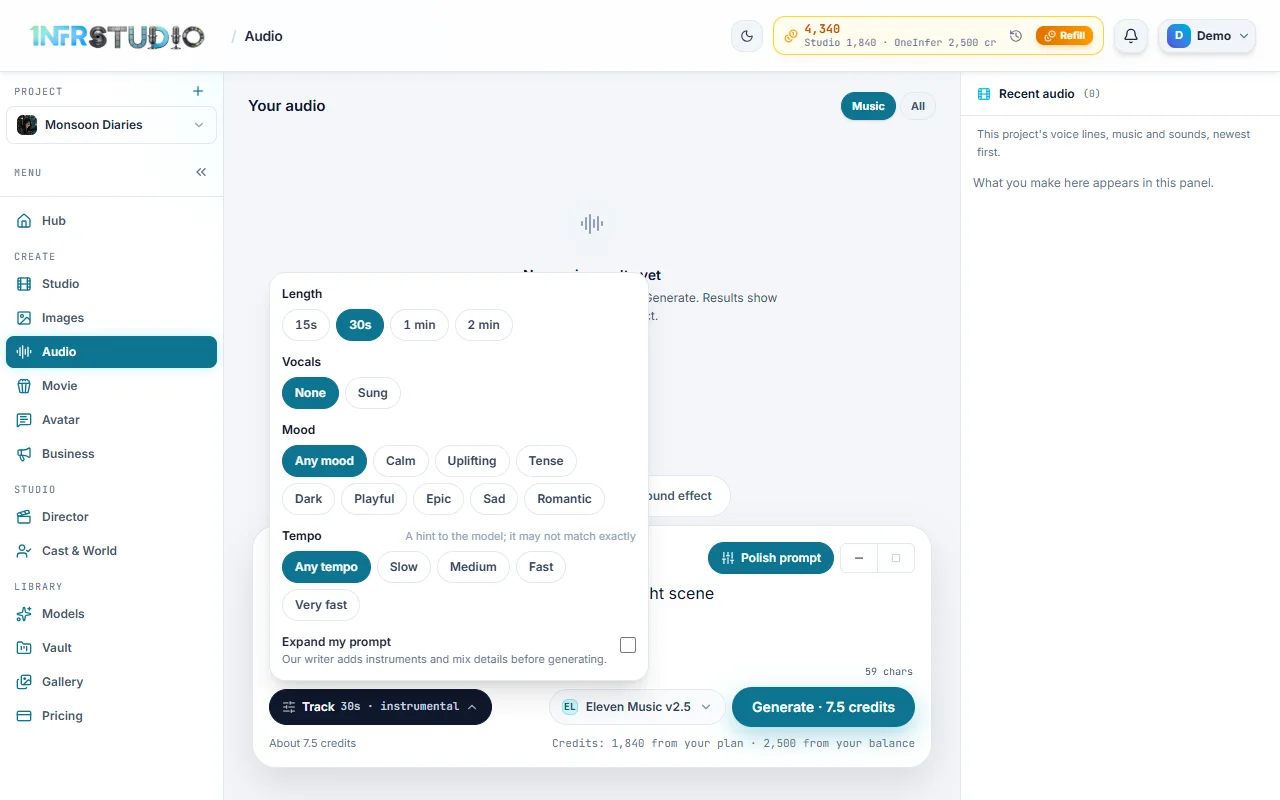
- Length: 15 s, 30 s, 1 min or 2 min on the Eleven models, 30 s by default. Lyria 3 has no length setting.
- Vocals: None (the default) or Sung. With Sung a Lyrics box appears, with [verse], [chorus] and [bridge] buttons. Leave it empty and the model writes the words.
- Mood: Any mood, Calm, Uplifting, Tense, Dark, Playful, Epic, Sad or Romantic.
- Tempo: Any tempo, Slow, Medium, Fast or Very fast. It is a hint, and the track may not match it exactly.
- Expand my prompt: a checkbox, off by default. When it is on, the prompt writer adds instruments and mix details before generating.
Sound effects
- Length: 0.5, 1, 2, 3, 5, 10, 15, 20 or 30 seconds, or Let the model choose.
- Loop: Plays once or Loop it, a sound that repeats without a gap.
After it is made
Each result has a play button, a seek bar, a download button and a delete button. Deleting asks you to confirm. Use in… opens:
- Director timeline: adds it at the playhead.
- Movie soundtrack: plays under the whole film. No music is generated. This one is offered for music.
- Keep in Vault only: it stays in your Vault, and you can add it to a project from there any time.
If a job fails, its card says why and offers Try again with the price. Everything you make is saved to your Vault.
Questions
Can I make a voice-over from a script a minute long?
Yes. Paste the script into What should they say? and the price follows its length, about 10 credits for 1,000 characters on the default model. Listen to a short part first if you are unsure of a voice.
Does Audio make a person speak on screen?
No. Audio makes sound only. For a face that speaks, use Avatar, or give a cast member a voice in Cast and World.
Why is there no length for some music?
Some models, such as Lyria 3, choose the length themselves. The price is per track.