DocsMake videos
Avatar
Avatar makes a person, pet or character in a picture speak your script, as a video. Use it for a presenter, a greeting, an explainer or a conversation between two or three speakers.
What you will make
A video of one speaker looking at the camera and saying your script, in the speaker's own voice, or a conversation of up to three speakers. Studio speaks the script in the voice, an avatar model makes the face move to it, and the server saves the finished video to your Vault, so you can leave the page. It is the tool for talking heads. For a story with scenes and shots, use Movie and Film; for a presenter beside your slides, see Business.
A talking video from start to finish
Say you want Meera, a character in your project, to open a presentation.
- Open Avatar in the menu. The layout is the same as Studio: the player on top, the box below, and Your avatar videos on the right.
- Press Cast and tick Meera. The tray title says Who speaks · up to 3. Close the panel. Only people, pets and creatures in this project's cast can speak.
- Write what Meera says in the big box: "Good morning, everyone. Today we start a new chapter together." Write it in any language the voice speaks.
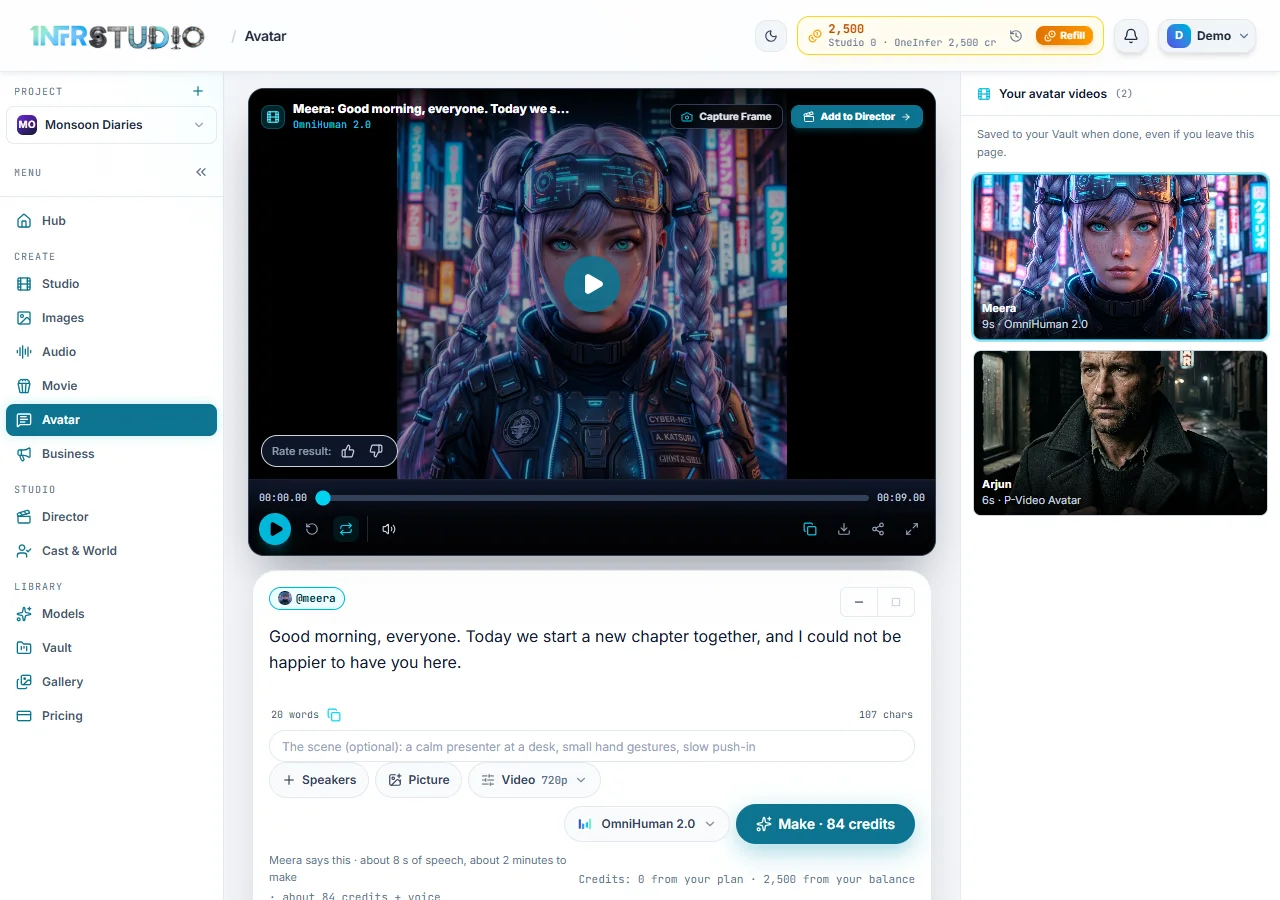
- Under the box Studio estimates the length and the price: "OmniHuman 2.0 says this · about 8s of speech, about a minute to make · about 84 credits + voice". The Make button carries the price: Make · 84 credits.
- Press Make. Studio says "Meera's video is being made, about a minute. It is saved to your Vault when it's done, so you can leave this page." The card in Your avatar videos counts down the time left.
- When it is done, the video plays in the player and the card shows its length and model.
What you will see
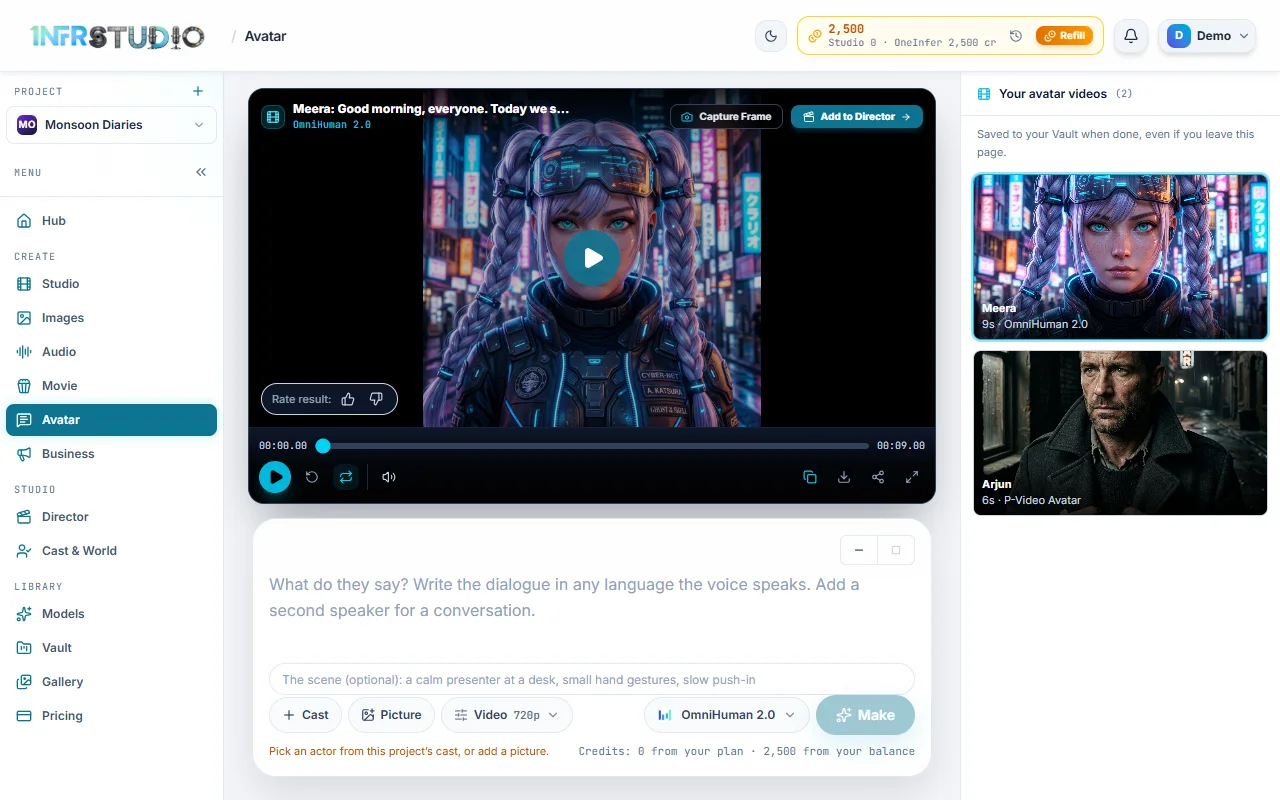
Under the box are Cast (it reads Speakers once someone is picked), Picture, Video (the settings, such as 720p), the model and Make. Above them a small box asks for The scene (optional): "a calm presenter at a desk, small hand gestures, slow push-in". It is used only by models that take a prompt.
Who speaks
- Cast lists your project's people, pets and creatures. You can pick up to three. Two or more make a conversation. You can start from Cast & World too: an actor's Make a talking video button opens Avatar with them chosen.
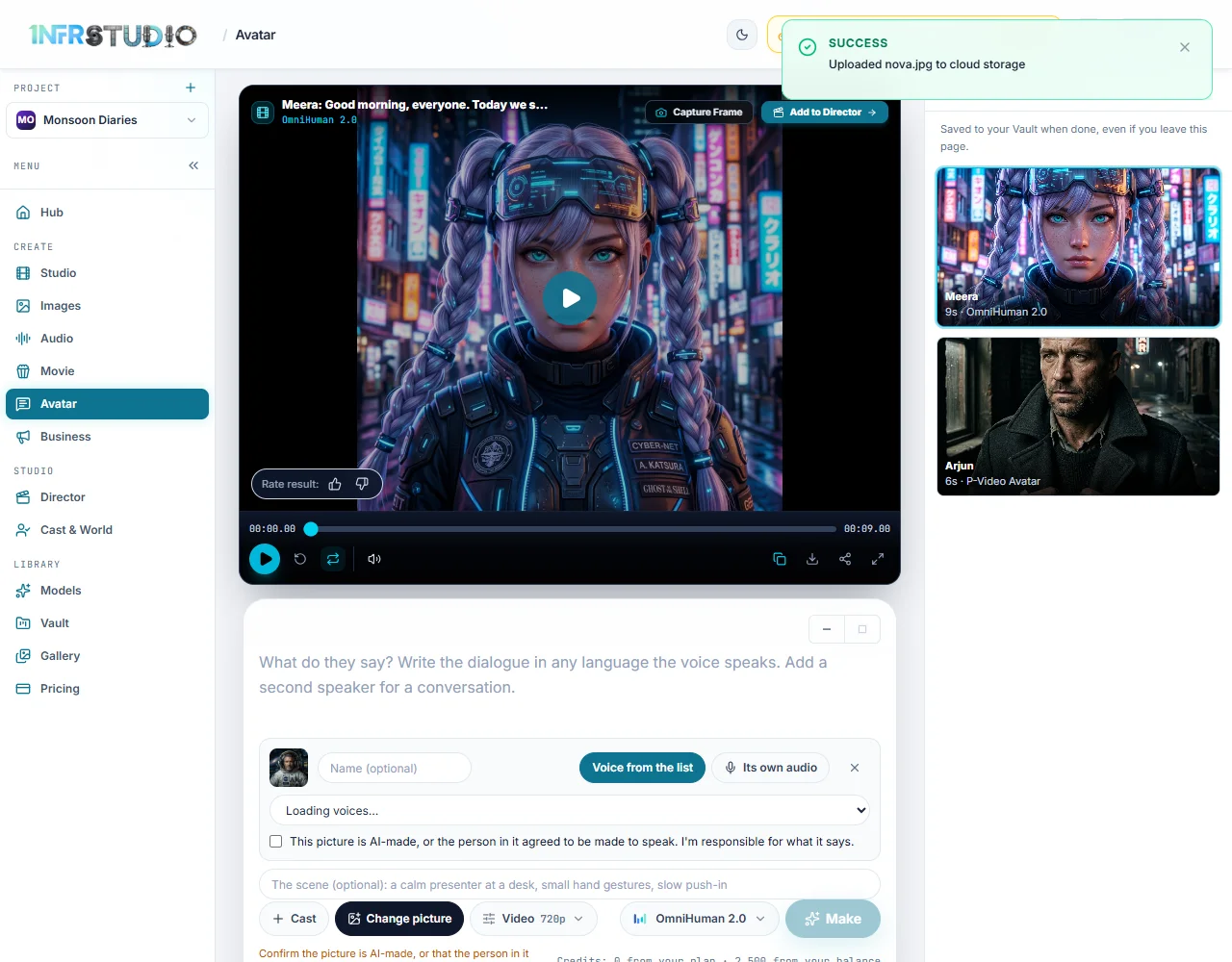
- Picture lets a picture speak that is not in your cast: Upload a picture (JPG, PNG or WEBP) or From your Vault. An uploaded picture counts as one speaker. Give it a Name (optional) and, if you want, press it to see it large.
- If a cast member's picture is a character sheet, Studio draws a front view for the first video, keeps it, and adds about 3 credits. That is included in the price shown.
The voice
- A cast member speaks in their own voice, from Cast & World. Just write the script.
- A picture has two choices: Voice from the list (pick one in Voice, shown as name, language and gender, and write the script in the box) or Its own audio (Add audio (MP3 or WAV); the video says what the audio says, the script box becomes an optional note, and the audio must be at least 4 seconds).
- In a conversation every speaker needs a voice, and own audio is not available.
The script
- Up to 8,000 characters. An empty box reads "Write what they say."
- Studio estimates the speech length at about 2.5 words a second (4 characters a second for Chinese, Japanese or Korean written without spaces), and holds it to 90% of the model's limit. Too long, and Make is off with a line like "This script takes about 1:40 to say; P-Video Avatar takes up to 1:45", plus a button to use another model that fits.
- Each video is at least 4 seconds.
- For a conversation write one line for each speaker: "Riya: Did you finish your water today?". A line with no name continues the last one. Write at least two lines. Each line is its own clip, priced separately, and they are cut together in your Vault when all are done. If some fail, Make the failed lines again makes only those.
The models and what they cost
Press the model button. Each row shows the maker, how long a video can be, the price per second, and a note. These are the prices at the time of writing; the list always shows the current ones, and a model with no published price is not offered.
| Model | Price a second | Longest | Notes |
|---|---|---|---|
| OmniHuman 2.0 (ByteDance) | 10.5 credits at 720p | 5 minutes | Gestures, scene and camera follow the prompt. The default. |
| Kling AI Avatar v2 Standard (Kuaishou) | 5.62 credits | 5 minutes | People, animals, cartoons and stylized characters. |
| P-Video Avatar (Pruna AI) | 2.75 credits at 720p, 4.95 at 1080p | About 1 min 45 s | The lowest price, and 1080p. No prompt. |
| Kling AI Avatar v2 Pro (Kuaishou) | 11.5 credits | 5 minutes | Higher quality Kling avatar. |
| Aurora (Creatify) | 14 credits at 720p, 7 at 480p | 5 minutes | Speaking or singing. |
| Fabric 1.0 (VEED) | 15 credits at 720p, 8 at 480p | 5 minutes | No prompt. |
| Fabric 1.0 Fast (VEED) | 20 credits at 720p, 10 at 480p | 5 minutes | Faster Fabric. No prompt. |
| OmniHuman 1.5 (ByteDance) | 16 credits | 1 minute | Up to 1 minute. |
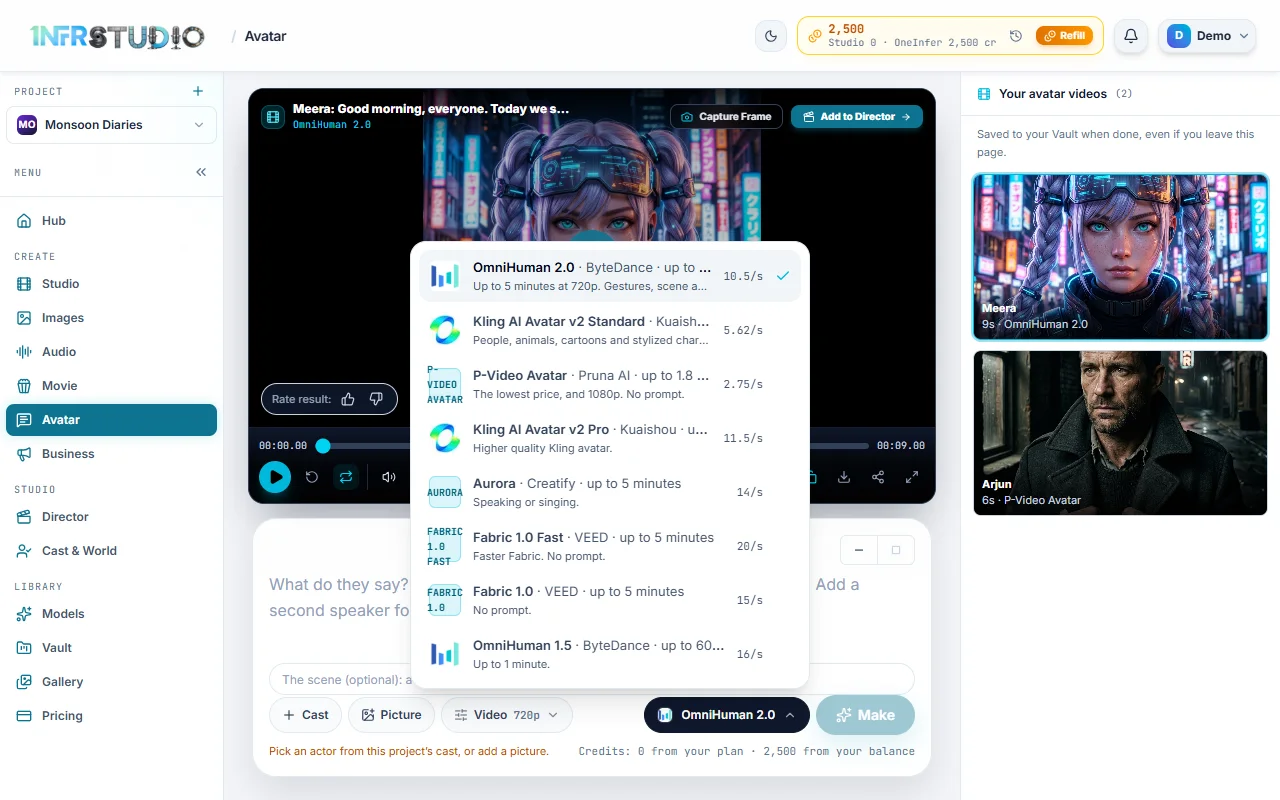
The price of a video is the length of the speech (rounded up, at least 4 seconds) times the price a second, so a 10 second script on OmniHuman 2.0 is about 105 credits, and on P-Video Avatar about 28. The voice adds a few credits. With your own audio there is no voice charge. Video has a Resolution for models that offer a choice; a size above your plan's is locked.
Consent and what is blocked
- A picture you upload needs a tick on This picture is AI-made, or the person in it agreed to be made to speak. I'm responsible for what it says. Without it, Make is blocked with "Confirm the picture is AI-made, or that the person in it agreed." The server checks it too.
- A cast member who is a real person is blocked until their face check is complete in Cast & World: "A real person can be made to say a script only after their face check is complete."
- Only a person, a pet or a creature can speak. Anything else is refused with "A
can't speak."
Your avatar videos
The right panel lists this project's avatar videos, newest first. A card shows the name and, when finished, "N s · model". While it works it says Making with the time left ("about 2 minutes left", "Almost done", or "Taking longer than expected"), then Saving to your Vault…. A failed card shows why. Press a card to play it.
Business presenter
The presenter in a Business presentation uses these same avatar models. There the price is added to the ad's price, and you pick a presenter, when they are on screen and which model makes them. See Presenter.
Questions
Which model should I use?
P-Video Avatar has the lowest price and 1080p. OmniHuman 2.0 and the Kling models follow a scene prompt and handle gestures. Use Aurora for singing.
Can it speak a language other than English?
Write the script in any language the voice speaks. A cast member speaks in their own voice; for a picture, pick one from the list (it shows each voice's language).
Can I use my own recording?
Yes, for a picture: choose Its own audio and add an MP3 or WAV of at least 4 seconds.
Why is Make greyed out?
Studio says why in amber under the box: no speaker or picture, no script, a script too long for the model, the consent box not ticked, or a real person's face check not finished.
Where does the video go?
To your Vault, and it is listed in Your avatar videos for the project.