
DocsChoose and pay
Credits and plans
Everything Studio makes costs credits, and 100 credits is $1. You see the price before you press the button. Plans add credits every month, and packs add more whenever you need them.
Two kinds of credits
You can hold credits in two places. Studio spends the first before the second.
| Studio credits | OneInfer credits | |
|---|---|---|
| Where they come from | Your plan each month, credit packs, and any welcome credits | Credits you topped up in the OneInfer developer console |
| Where they work | In Studio only | In Studio and on the OneInfer API |
| Do they expire | No | No |
| Spent | First | When Studio credits run out |
Each prompt box shows both, for example Credits: 1,840 from your plan · 2,500 from your balance. The box at the top right shows Studio 1,840 · OneInfer 2,500 cr, with Credit history and Refill. The two add up to what you can spend. If you have OneInfer credits left, running out of Studio credits does not stop you.
A credit is a cent, in both wallets. The plans and packs give 100 credits for every dollar, with no bonus credits.
Plans
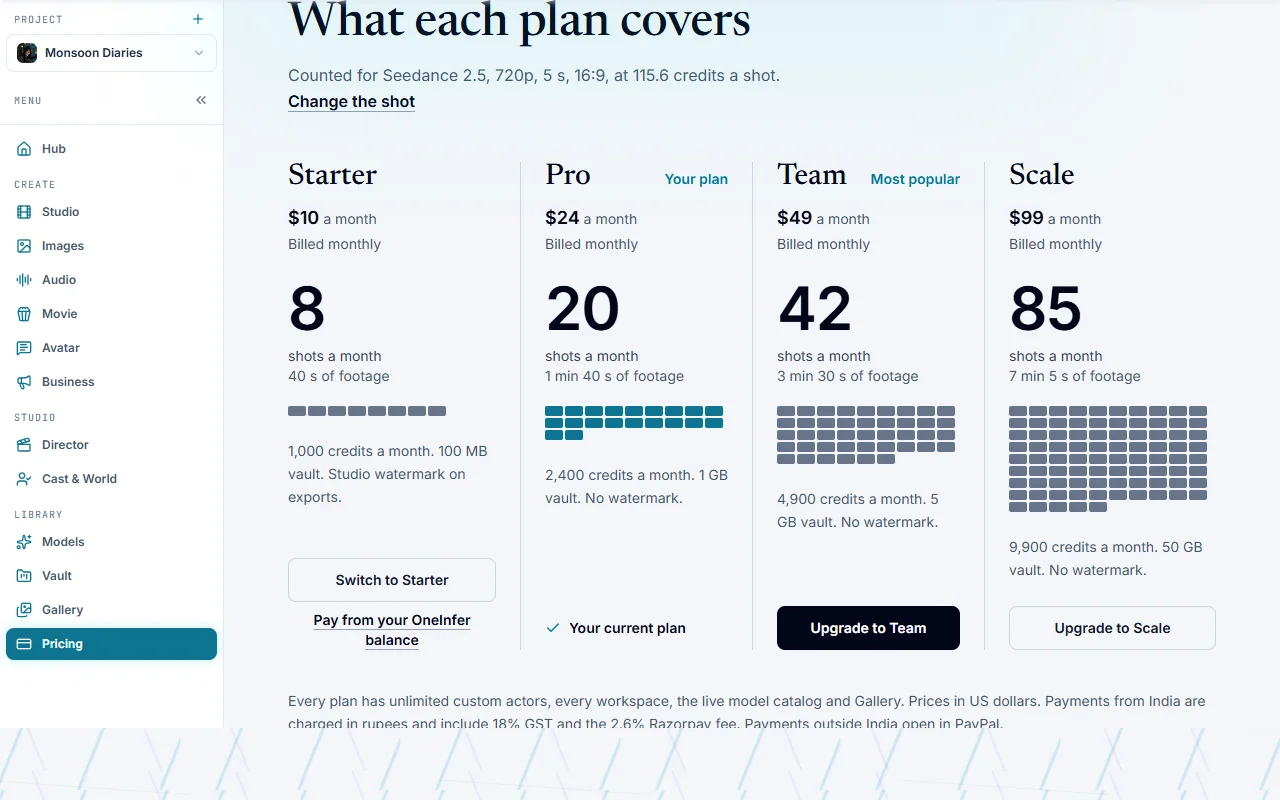
A plan is billed monthly and adds its credits to your Studio credits each month, on top of what is left. Plans differ in credits, storage and the largest export.
| Starter | Pro | Team | Scale | |
|---|---|---|---|---|
| Price a month | $10 | $24 | $49 | $99 |
| Studio credits a month | 1,000 | 2,400 | 4,900 | 9,900 |
| Vault storage | 100 MB | 1 GB | 5 GB | 50 GB |
| Largest export | 720p | 1080p | 4K | 4K uncompressed |
| Watermark on exports | Yes | No | No | No |
| Real faces for Seedance | 1 (kept 7 days) | 5 (48 hours) | 15 (7 days) | 30 (30 days) |
Every plan has unlimited custom actors, places and props, every screen, the live model list and the Gallery. Yearly billing is not offered, and you can stop any month.
Press the plan's button on Pricing (Get Starter, Get Pro, and so on; once you have a plan, Upgrade to or Switch to). If your OneInfer balance covers the plan's price, Pay from your OneInfer balance takes it from there. The plan's own credits are never used to pay for the plan.
If a plan lapses, your files stay readable for a 30-day grace period, and Studio shows a note on Pricing. See Vault.
Credit packs
For credits without a plan, buy a pack from Refill at the top right, or from Pricing. A pack adds Studio credits, which never expire.
| Pack | Credits | Price |
|---|---|---|
| 500 credits | 500 | $5 |
| 2,400 credits | 2,400 | $24 |
| 3,500 credits | 3,500 | $35 |
| 15,000 credits | 15,000 | $150 |
The $24 pack also sets the Pro plan for 30 days, so its 1080p exports and watermark-free video come with it. It does not lower a Team or Scale plan. The other packs add credits only, so your exports stay at your plan's size.
Paying
Payments from India are charged in rupees and include 18% GST and the 2.6% Razorpay fee. Payments from anywhere else open in PayPal and are charged in US dollars. In a shared workspace, only an Owner or a Billing member can buy plans and packs. To top up your OneInfer credits, use the OneInfer developer console.
Welcome credits
A new account starts with 0 credits. You can ask for 500 welcome credits with Claim 500 credits (in Refill, or in the offer shown when you first sign in). The OneInfer team reviews each claim, and the credits are added only when it is approved. See Getting started.
Seeing the price before you spend
Studio shows what something will cost before it takes any credits.
- Studio, Images and Audio: the Generate button carries the price, for example "5s at 720p · about 116 credits" for the default clip, and the line under the box repeats it. If you do not have enough, the line turns amber and says how many you need.
- Movie and Film: the plan has a Start button with the quote, and the top right says "Quote about N credits · spent M". See Movie and Film.
- Business: Start · about N credits on the plan. See Business.
- Director: the Export window shows the cost, and Render 16s · 8 credits on its button. See Director.
- Models: each model that can make a job shows its price. See Models.
Pricing itself is a calculator. Under Price a shot first. Then pick a plan., choose a Model, Length, Resolution and Frame, and With sound where the model has it. It shows the price in credits and dollars, for example "That's $1.16, since a credit is a cent.", and when you are signed in, how many of these shots your credits cover. Under What each plan covers, every plan is counted in shots of the same kind. The prices come from the live price list when it loads; if it does not, the page says it is using Studio's built-in rates, and Generate always shows the final number.
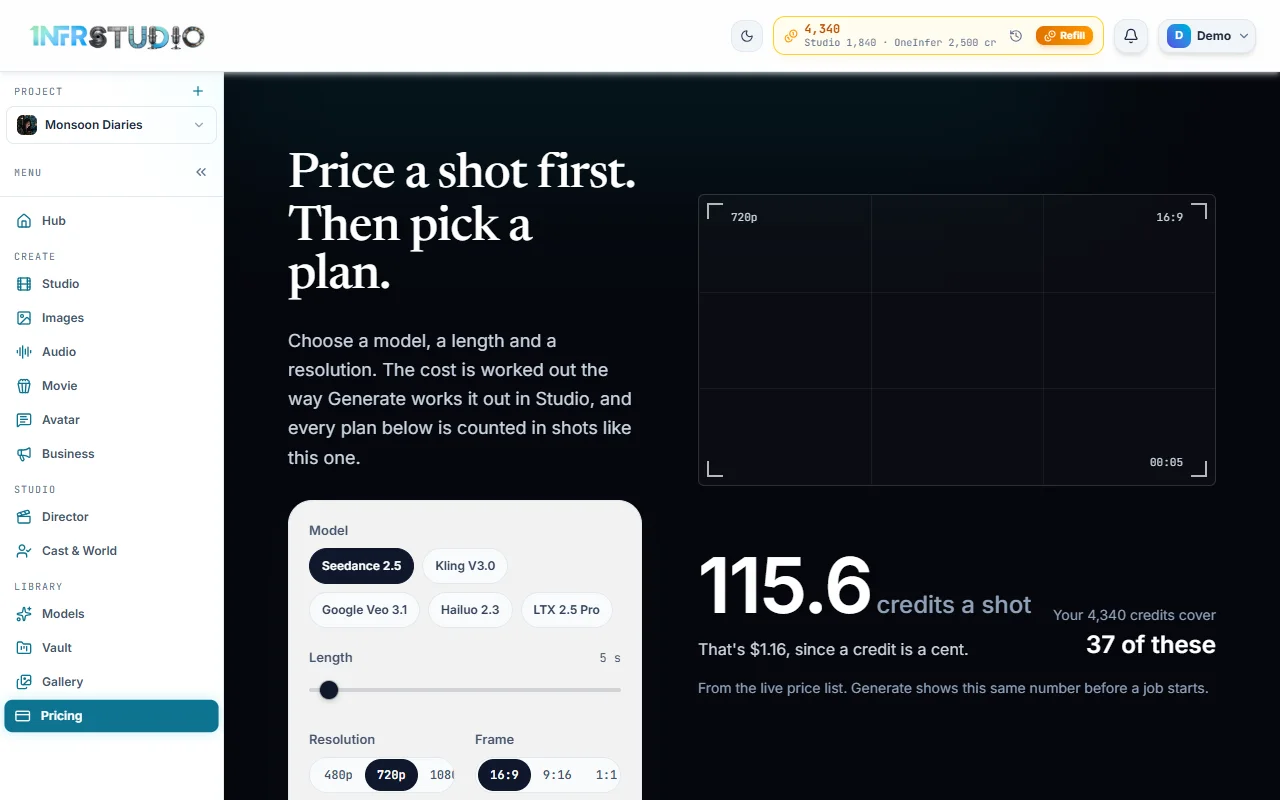
Prices follow the model, the length, the size and sometimes the sound. The docs give examples and say "about"; the button is always the real number.
Questions
Do my credits expire?
No. Studio credits from your plan, from packs and from promotions stay in your balance. Each month a plan adds its credits on top.
What happens when I run out of Studio credits?
Studio uses your OneInfer credits next, if you have any. If you have none, buy a pack from Refill or choose a plan on Pricing.
Why does the same clip cost different amounts on different models?
Each model is priced by its provider, by the length, the resolution and sound. Open the model list in a screen to see each price, or use the calculator on Pricing.
Can I pay by card or by UPI?
Payments from India go through Razorpay, and it offers the payment methods it supports there. Payments from other countries open in PayPal.
Is there a free trial?
You can browse the Hub, the Gallery and the screens without an account. Making anything needs credits, and new accounts can ask for 500 welcome credits, which the team approves. See Getting started.