
DocsYour library
Vault
The Vault is your private library. Every clip, picture, voice line and track you make is saved here, and so is every file you upload. Only you can see it until you choose to publish something.
What you will find
Open Vault in the menu. The page says Private by default. Everything Studio makes for you lands here, in the project you were working in: clips from Studio and Movie and Film, pictures from Images, sound from Audio, cast sample voices, and finished exports from Director. Your own uploads sit beside them. The same list is what the Media tab in Director and the pickers in other screens draw from.
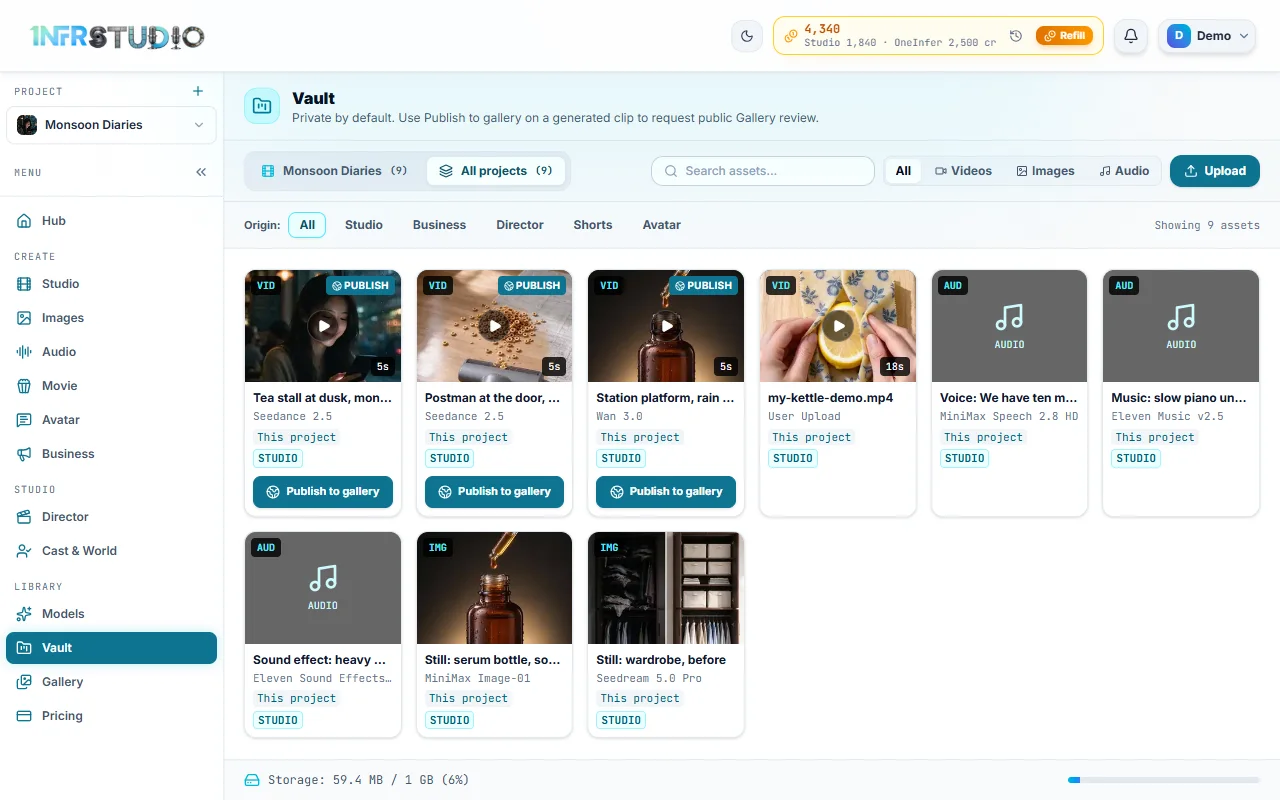
Each card shows what it is (VID, AUD or IMG), its name, the model that made it (an upload says User Upload), whether it is from This project or Other project, and the part of Studio that made it. Videos show their length. Press a card to open it: pictures open in a viewer with zoom and full screen, and clips and sound play. The small buttons on a card open Details (the prompt and the model), Download and Delete. Deleting asks you to confirm.
Uploading
Press Upload, or drag files onto the page, or paste a picture. The Vault takes:
| Kind | Files |
|---|---|
| Video | MP4, MOV, WebM |
| Sound | MP3, WAV |
| Pictures | PNG, JPG, WebP |
Any other file is refused with a message that names what is accepted, before it is sent. You must be signed in.
A larger upload shows a notice with its name, its size and a progress bar, and a Cancel button. When it reaches 100% the notice says Sent. Reading its length and sound… while Studio reads the real length of the file. When it is done the file is at the top of the list. If a file is too big, the message says so and suggests a shorter clip or a smaller export.
If you upload while looking at one project, the file belongs to that project. If you upload while on All projects, it has no project and shows No project; you can still use it anywhere.
Projects, search and filters
Two buttons at the top left choose what you see. The first is the project you are working in, with its count, for example Monsoon Diaries (9); it shows that project's files and your files that belong to no project. All projects shows everything in your account.
- Search assets... looks in names and prompts.
- All, Videos, Images and Audio filter by kind.
- Origin filters by where it was made: All, Studio, Business, Director, Shorts or Avatar.
Using a file
A clip or picture from the Vault can go into the next thing you make: as a frame or a reference picture in Studio, as the clip an ad is built around in Business, as a face photo in Cast and World, or on the Director timeline with the + button. The picker in each screen shows the Vault and says what it is picking, for example Select Reference Image.
Publishing
A clip that Studio made shows Publish to gallery on its card. It sends the clip for staff review; see Gallery for the form and what happens next. The card then shows Pending review, In gallery or Rejected — resubmit.
A picture, clip or sound that Studio made from words also shows Share prompt. It sends the prompt and its result to the Prompt Library for an editor's review, so others can try it. The card then shows Prompt in review or Prompt in library.
Storage
The bar at the bottom shows what you use and what your plan allows, for example Storage: 59.4 MB / 1 GB (6%).
| Plan | Vault |
|---|---|
| Starter | 100 MB |
| Pro | 1 GB |
| Team | 5 GB |
| Scale | 50 GB |
Delete files you no longer need to make room. If a plan ends, files stay readable and downloadable for a 30-day grace period; see Credits and plans.
Questions
Is my Vault private?
Yes. Nothing in it is seen by anyone else unless you publish a clip to the Gallery and it is approved.
Where did my clip go?
Search for it in the All projects view. A clip made while another project was open is in that project.
Can I upload a picture?
Yes. PNG, JPG and WebP. The Media tab in Director takes video and sound uploads; add pictures here.
What happens when I delete a file?
It is removed from the Vault, after you confirm. Keep what a project still uses.