DocsMake videos
Studio
Studio makes one video clip at a time from a few words. Write the shot, pick a model, see the price, press Generate, and keep the clip in your project.
What you will make
A clip of 4 to 30 seconds, depending on the model: a shot for a story, an ad, a reel, a moving picture of something you made in Images, or a test of how a new model sees your idea. Studio is the place for one shot. When you want a story made of many shots with the same cast, use Movie and Film.
Here are clips made this way, with the words that made them.
Prompt for the corridor: "A woman in a camel trench coat walks toward the camera down a long arched corridor. Late sun through tall windows, slow dolly back, soft haze, 35mm."
Prompt for the hummingbird: "Macro shot of a hummingbird hovering at a red hibiscus in a rainforest. Wings blurred, shallow depth of field, morning light."
Prompt for the butterfly, made with Wan 3.0: "Cinematic nature commercial, 16:9, 24fps, 85mm prime lens, shallow depth of field. A brilliant metallic blue morpho butterfly gently rests on a bright orange tropical orchid dripping with morning rain. Sunlight breaks through a dense rainforest canopy, casting dappled, warm volumetric sunbeams across the scene. The camera executes a slow, buttery smooth 180-degree orbit around the flower. Dewdrops glisten on the vivid orange petals, and the butterfly's wings open and close slowly with micro-flutters, revealing shimmering structural color. Pristine natural realism, vivid color contrast, zero frame jitter."
The first two are a sentence or two: who or what, where, the light, and what the camera does. The third shows how much detail a model will take when you give it.
A clip from start to finish
Say you want a short establishing shot for a film about the monsoon.
- Open Studio in the menu and check the project in the left menu.
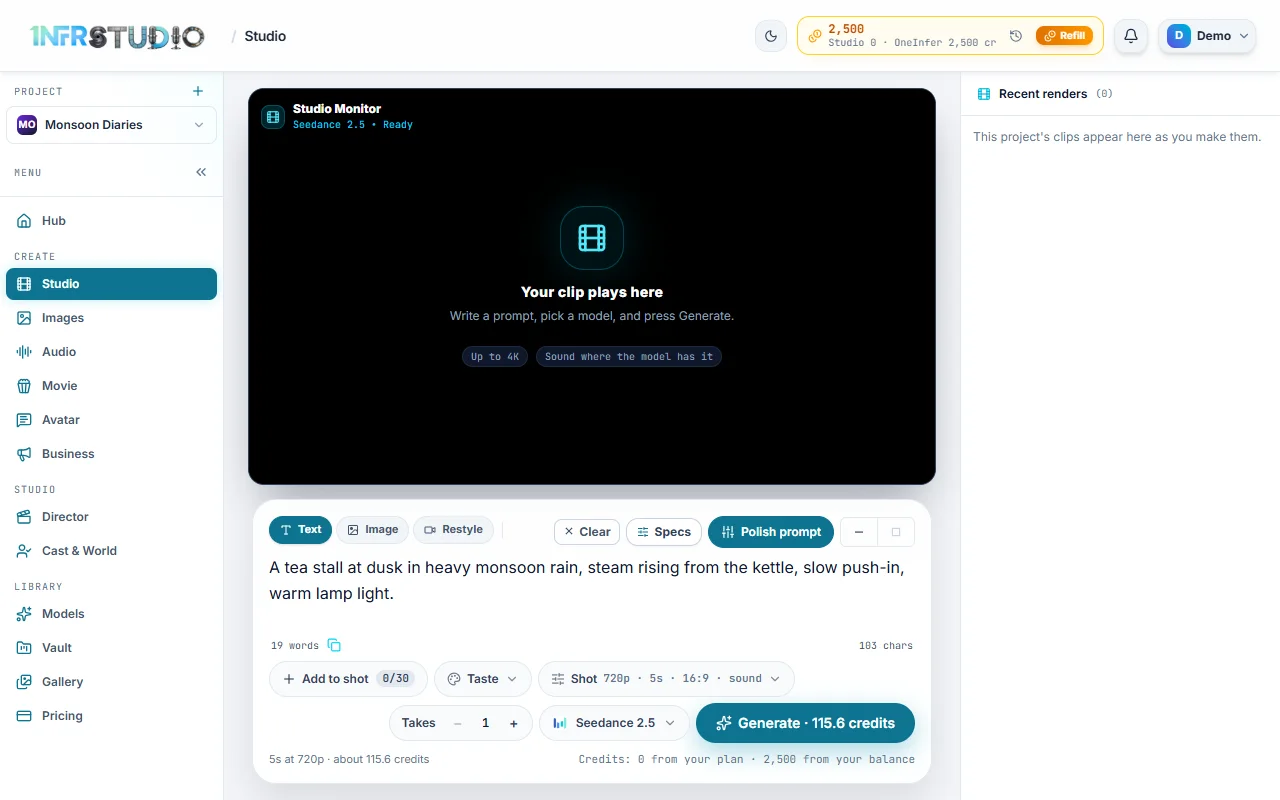
- Click the prompt box and write: "A tea stall at dusk in heavy monsoon rain, steam rising from the kettle, slow push-in, warm lamp light."
- Look under the box. It reads "5s at 720p · about 116 credits", and the same number is on the Generate button. Those are the defaults: Seedance 2.5, 5 seconds, 720p, 16:9, with sound.
- Press Generate. The player shows progress while the model works. When it is done the clip plays, and it is saved to your Vault and listed in Recent renders.
If you are not signed in, Generate asks you to sign up first. If you do not have enough credits, the line under the box turns amber and says how many you need.
What you will see
The player ("Studio Monitor") is on top and says Your clip plays here until there is a clip. The prompt box is under it, and Recent renders is on the right (on a narrow screen it is a strip above the box).
Above the box, three pills choose the kind of shot:
| Pill | What it does |
|---|---|
| Text | A clip from words alone. The default. |
| Image | A clip that starts from a picture you add. |
| Restyle | Changes the look of a video you already have. It needs a source video and, if you like, a style picture. |
Under the box, left to right: Add to shot, Taste, Shot, Takes, the model, and Generate.
The prompt
Describe one continuous scene: the subject, the place, the light and the camera. A few rules that work for every model:
- Keep it to one moment. Studio makes one shot, not a cut between places.
- Name the camera: "slow push-in", "handheld", "tracking shot from behind".
- Type @ and a name to put one of your cast in the shot. See Cast and pictures.
- Polish prompt rewrites your words into a fuller prompt for the model, shape and Taste you picked. It shows "Polishing…" while it works.
- Clear empties the box. The box takes up to 12,000 characters.
- You can paste a picture into the box (Ctrl+V) to add it to the shot.
The grey words that type themselves in the empty box are only examples. Generate stays off until you write something yourself.
Pick the model
Press the model button (it shows Seedance 2.5 at first). The list shows each model's name, a short note, what it can do and its price for a clip at its default settings. At the time of writing, prices in the list ranged from about 25 credits for MiniMax H3 and 50 for Wan 3.0, to about 116 for Seedance 2.5.
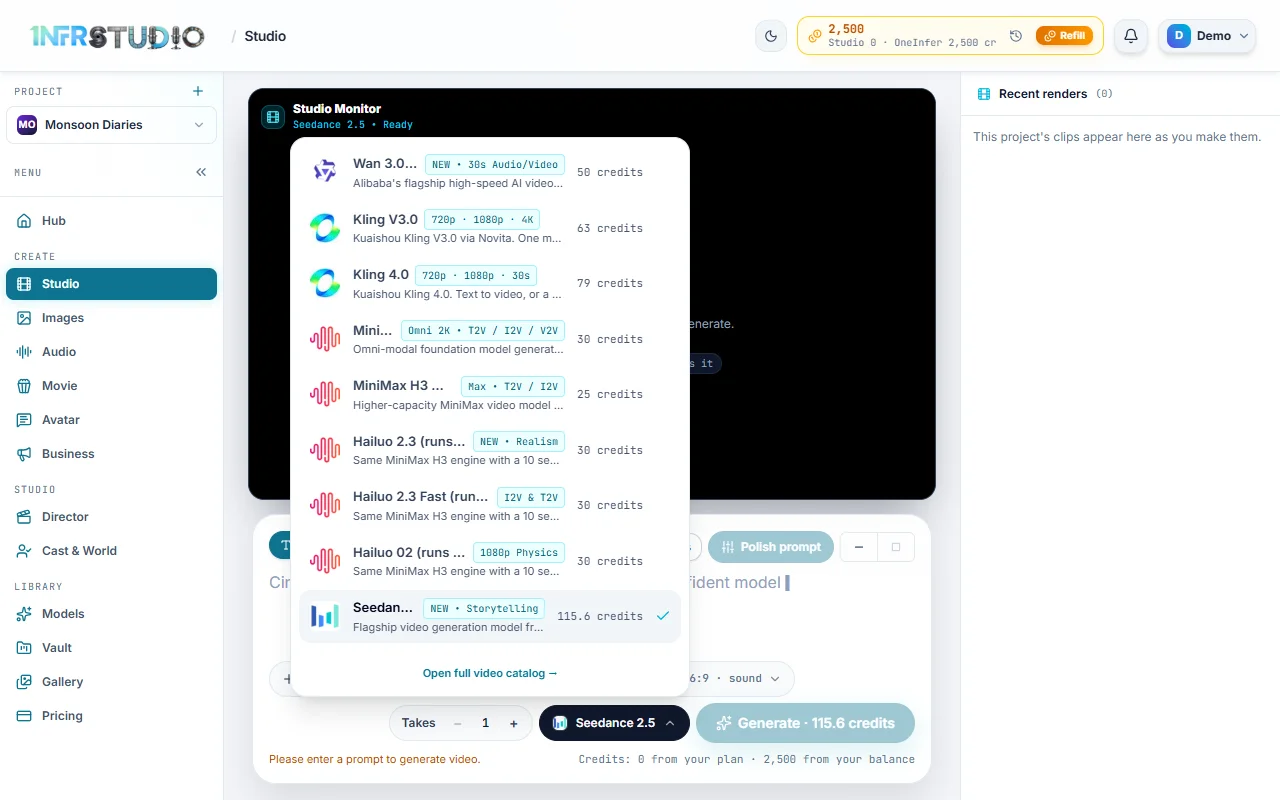
- The list depends on the pill: models that cannot start from a picture do not show under Image.
- A model with no published price is not offered, so every row has a price.
- Open full video catalog opens Models, with what each model is for and what it can't do.
Different models want different amounts of detail. Seedance 2.5 takes up to 30 reference pictures and several shapes; others take frames only. The sections below say what each control does and when it is missing.
Length, shape, resolution and sound
Press Shot. Its label summarises the choice, for example "720p · 5s · 16:9 · sound".
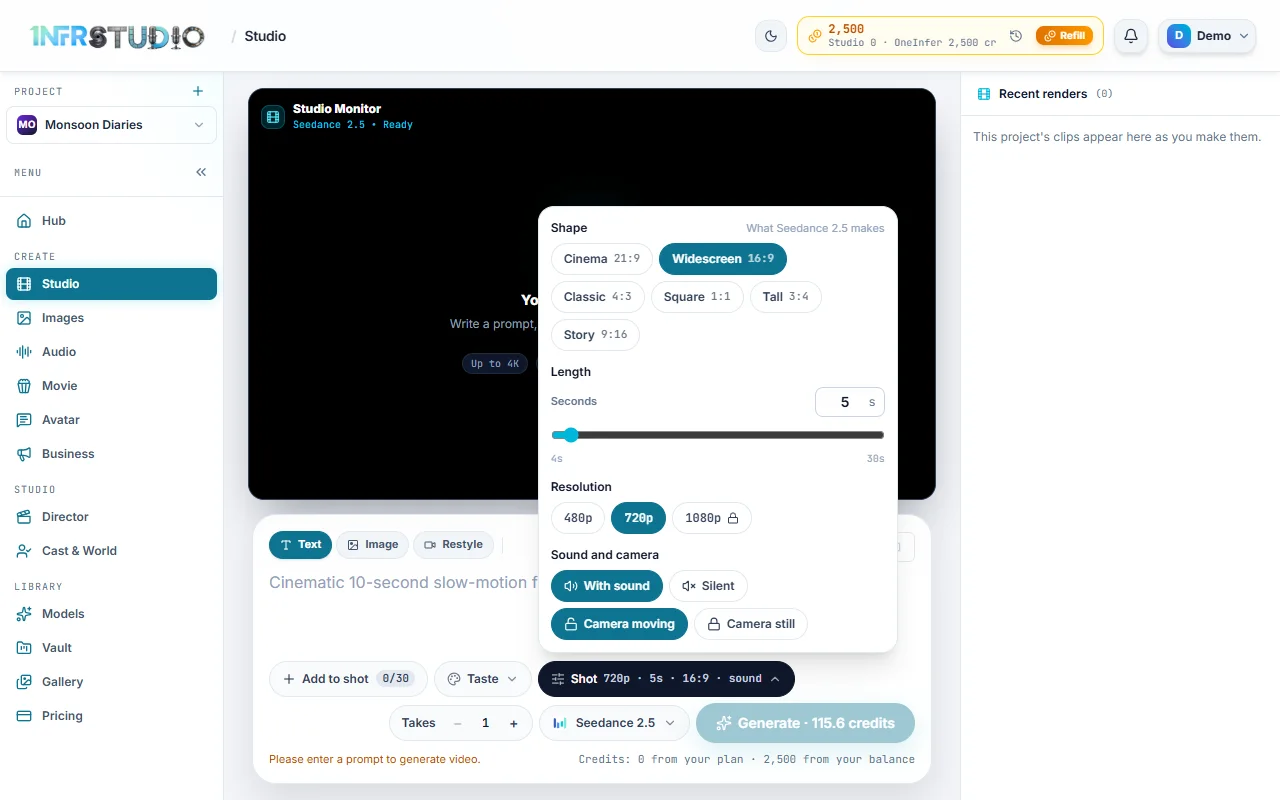
- Shape: the shapes the model can make, such as Widescreen 16:9, Story 9:16 or Square 1:1. The default is 16:9.
- Length: a slider and a box in seconds. The range is the model's own (Seedance 2.5 runs from 4 to 30 seconds). The default is 5.
- Resolution: for example 480p, 720p and 1080p. The default is 720p. A size above your plan's is shown with a lock; pressing it points you to the plan.
- Sound and camera: With sound (on by default) or Silent, and Camera moving or Camera still. A model with no choice says so, for example that it always makes clips with sound or without.
Price follows all of these. A longer clip, a bigger size and sound all cost more, and the number on Generate changes as you move them.
Takes
Takes makes the same prompt more than once (1 to 4; the default is 1). Each take is charged, and they run one after another, so you can pick the best. With more than one take the button reads, for example, Generate 3 takes · N credits.
Cast and reference pictures
Press Add to shot (it shows how many pictures it holds, such as 0/30). A panel opens with Cast, Places and Props from Cast & World, and the ways to add a picture: From device, Paste, Camera, From Vault and Make a still.
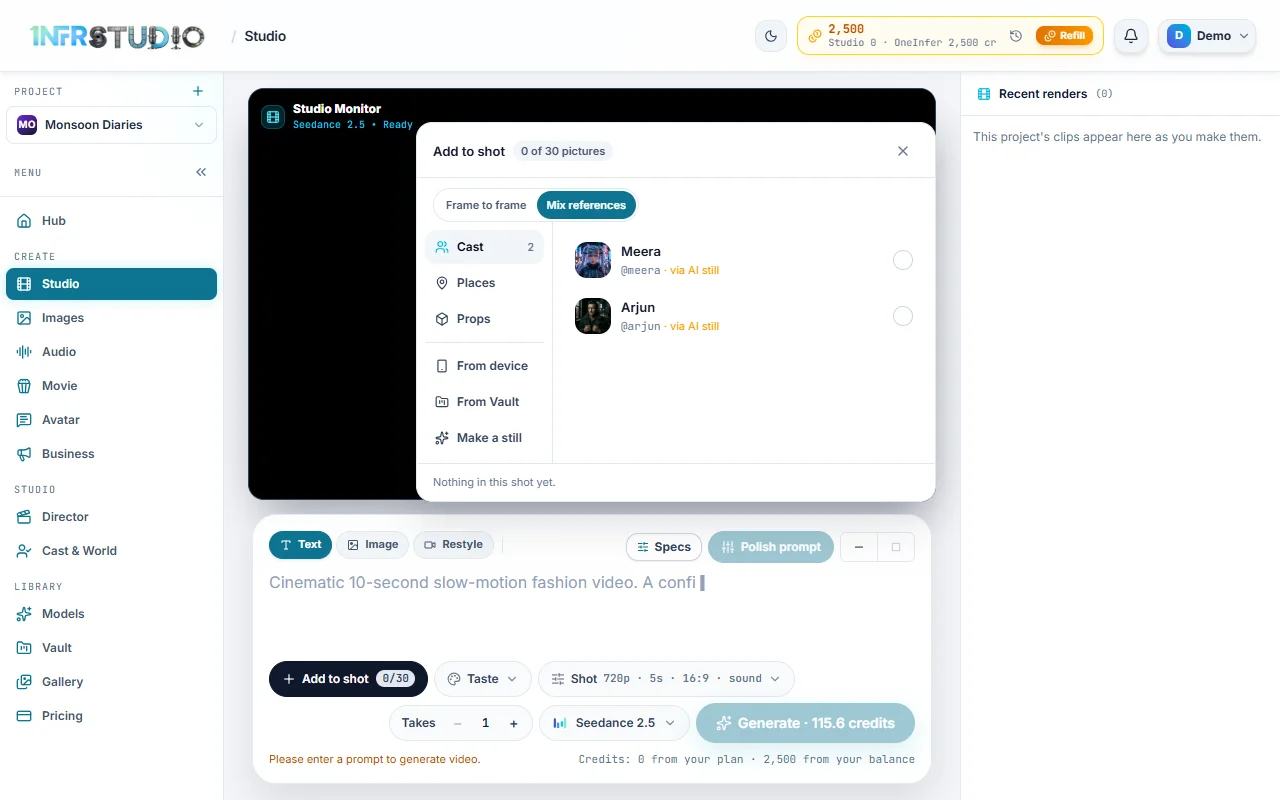
Two modes, shown as Frame to frame and Mix references:
- Frame to frame: the first picture is what the shot Opens on (the start frame). Add a second for what it Ends on (the end frame). Not every model takes an end frame; where one does not, the button says No end frame.
- Mix references: pictures guide the shot without being its first frame. Each picture can be Opens on, Look (guides style, places and props) or Ends on.
How many pictures a shot can take depends on the model: Seedance 2.5 up to 30, Seedance 2.0 and its Fast and Mini versions 9, MiniMax H3 9, Wan 3.0 5, and models that take only frames, one or two. The counter reads "N of M pictures", and if you add too many it tells you to remove some. If the model takes only a first frame and you tagged an actor, Studio first draws a still of the actor and then animates it. That adds the cost of the still, and it is included in the price.
Studio has controls for reference pictures only; it has no place to add a reference video or audio. An actor's own voice is sent along by itself when they speak.
In Restyle, the panel shows Source video (Use the video in the player, From device or from the Vault) and an optional Style picture.
Taste
Taste is a ready-made look: Film noir, 1980s VHS / retro TV, Liquid splash commercial, Glossy product studio, Creator on a phone, Golden-hour documentary, Neon night, Pastel symmetry, Claymation, Anime cel, Storybook watercolour, 1980s cinema and 1982 disco. The default is No taste.
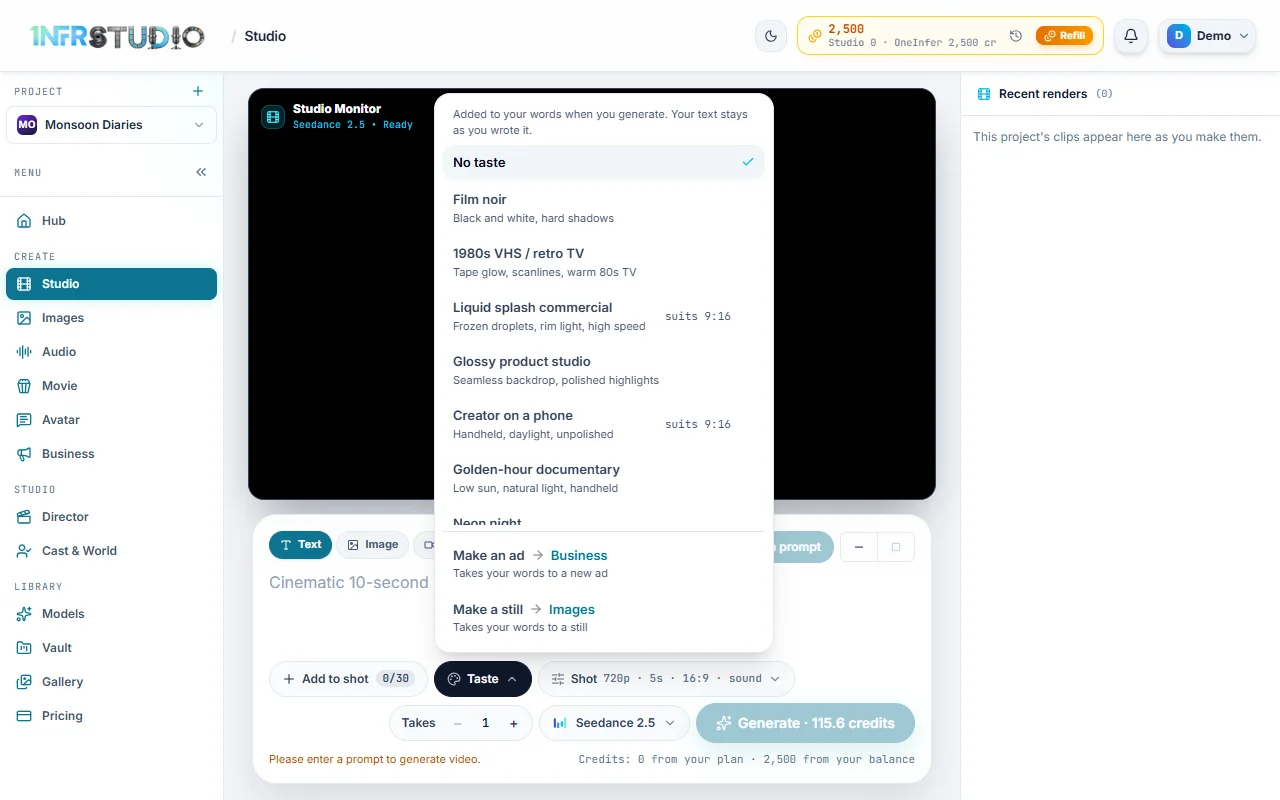
A Taste adds its words to your prompt only when you press Generate. Your own text stays as you wrote it. A few tastes say suits 9:16. The links at the bottom of the list take your words to Business (Make an ad) or Images (Make a still).
The price before you spend
Studio shows the price three times before you press Generate: on the model's row in the list, on the Generate button, and in the line under the box ("5s at 720p · about 116 credits"). With Takes above 1 it multiplies, and if Studio has to draw a first frame first, the line says the number includes it. The wallet line on the right shows your plan and balance credits.
The price is the platform's published rate for that model at that length and size, so it matches what is taken.
Recent renders
Recent renders lists this project's latest clips (up to 30), newest first. Press one to play it. Each card has Share and Download. Only videos from this project show here, not stills or audio.
After a clip is made, the player has: MP4 (download), Share (to another app), Capture Frame (grab a still to use as a start frame), and Add to Director (put the clip on the timeline). A clip is saved to your Vault automatically. If saving fails, Studio says so and tells you to download it right away because the link expires within a day.
Questions
Why is Generate greyed out?
You have not written a prompt, or the model needs a start frame (Image mode), or you do not have enough credits. The reason is written in amber under the box.
Can I make the clip longer than the model allows?
No. The Length range is the model's own. For a longer piece, make several clips and join them in Director, or write a story in Movie and Film.
Which model should I use?
Start with the default, Seedance 2.5. If you need a lower price, try Wan 3.0 or MiniMax H3. Models says what each is for.
Does my Taste change my prompt?
No. It is added on the way to the model, and your words stay as you wrote them.
What happens to the clip if I leave the page?
It keeps making, and when it is done it is saved to your Vault with the project you were in.